The Simple Network Management Protocol (SNMP) is an application layer protocol that facilitates the exchange of management information between network devices and it is part of the Transmission Control Protocol/Internet Protocol (TCP/IP) protocol suite. SNMP enables network administrators to manage network performance,solve and find network problems, and plan for network growth.
A D V E R T I S E M E N T
Two versions of SNMP exist: SNMP version 1 (SNMPv1) and SNMP version 2 (SNMPv2) and both versions have a number of features in common, but SNMPv2 offers enhancements, such as additional protocol operations. Standardization of yet another version of the SNMP�SNMP Version 3 (SNMPv3)�is pending.
SNMP Basic Components
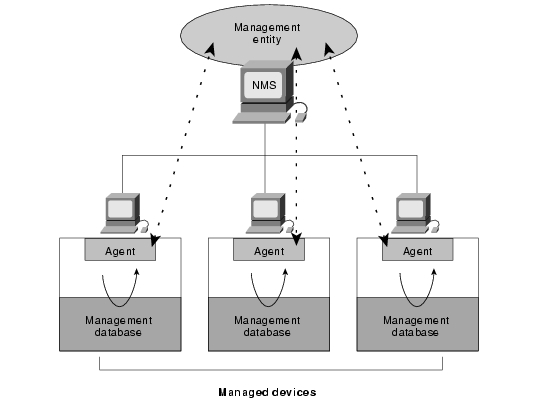
An SNMP-managed network consists of three key components: agents, managed devices, and network-management systems (NMSs).
A managed device is the network node that contains an SNMP agent and that resides on a managed network. Managed devices store and collect management information and make this information available to NMSs using SNMP. Managed devices, sometimes called network elements, can be access server and srouters, switches and bridges, hubs, computer hosts, or printers.
An agent is a network-management software module that resides in a managed device and it has local knowledge of management information and translates that information into a form compatible with SNMP.
An NMS executes applications that control and monitor managed devices. NMSs provide the bulk of the processing and memory resources required for network management and one or more NMSs must exist on any managed network.
Figure below illustrates the relationships of these three components.
SNMP Basic Commands
Managed devices are controlled and monitored using four basic SNMP commands: read, write, trap, and traversal operations.
The read command is used by an NMS to monitor managed devices and the NMS examines different variables that are maintained by managed devices.
The write command is used by an NMS to control managed devices and the NMS changes the values of variables stored within managed devices.
The trap command is used by managed devices to asynchronously report events to the NMS and when certain types of events occur, a managed device sends a trap to the NMS.
Traversal operations are used by the NMS to determine which variables a managed device that supports and to sequentially gather information in variable tables, such as a routing table.
LDAP
Light Weight Directory Access Protocol (LDAP) is an open network protocol standard that designed to provide access to distributed directories. LDAP provides a mechanism for modifying and querying information that resides in a directory information tree (DIT).
A directory information tree typically contains a broad range of the information about different types of network objects including users, printers, applications, and other network resources.
LDAP is described through four basic models: Information, Naming,Security, and Functional.
The combination of these models introduces a nomenclature that describes their attributes and entries, and provides methods to query and manipulate their values.
The structure of an LDAP directory tree
LDAP directory servers store their data hierarchically and if you've seen the top-down
representations of DNS trees or UNIX file directories, an LDAP directory
structure will be familiar ground. As with DNS host names, an LDAP directory
record's Distinguished Name (DN for short) is read from the individual entry,
backwards through the tree, up to the top level. More on this point later.
Why break things up into a hierarchy? There are a number of reasons. Here are a few
possible scenario:
You
may wish to push all your US-based customer contact information to an LDAP
server in the Seattle office (which is devoted to sales) and you
probably don't need to push the company's asset management information
there.
You may wish to grant permissions to a group of individuals based on
directory structure. In the example listed below, the company's asset
management team might need full access to the asset-mgmt section and not to
other areas.
Combined with replication, you can tailor the layout of your directory
structure to minimize WAN bandwidth utilization and your sales office in
Seattle might need up-to-the minute updates for US sales contacts, but only
hourly updates for European sales information.
Advantages of Using LDAP
With LDAP ACIs, you can
do things like:
Grant users the
ability to change their home address and home phone number, while
restricting them to read-only access for other data types (such as job title
or manager's login).
Grant anyone in the
group "HR-admins" the ability to modify any user's information for the
following fields: manager, job title, employee ID number, department name,
and department number and there would be no write permission to other fields.
Deny read access to
anyone attempting to query LDAP for a user's password, while still allowing
a user to change her or his own password.
Grant managers
read-only permission for the home phone numbers of their direct reports,
while denying this privilege to the anyone else.
Grant anyone in the
group "host-admins" to create,edit, and delete all aspects of host
information stored in LDAP.
Via a Web page,
allow people in "foobar-sales" to selectively grant or deny themselves read
access to subsets of the customer contact database and this would, in turn,
allow these individuals to download the customer contact information to
their local laptops or to a PDA. (This will be most useful if your sales
force automation tool is LDAP-aware.)
Via a Web page,allow any group owner to remove or add any entries from groups they own. For
example, this would allow sales managers to grant or remove access for
salespeople to modify Web pages. This would allow owners of mail aliases to
add and remove users without having to contact IT and mailing lists designated
as "public" could allow users to add or remove themselves (but only
themselves) to or from those mail aliases. Restrictions can also be based on hostname
or IP address. For example, fields can be made readable only if user's IP address begins with 192.168.200.*, or if the user's reverse DNS
hostname maps to *.foobar.com.