Academic Tutorials


English | French | Portugese | German | Italian
Google

Home Source Codes E-Books Downloads Contact Us About Us

Data Structures Using C
Introduction to Data Structures
Pointers and Indirection
Linear Data Structures
Stacks: The Abstract View
Queues: The Abstract View
Introduction to Trees
Introduction to Graphs

HTML Tutorials
HTML Tutorial
XHTML Tutorial
CSS Tutorial
TCP/IP Tutorial
XML Tutorials
XML Tutorial
XSL Tutorial
XSLT Tutorial
DTD Tutorial
Schema Tutorial
XForms Tutorial
XSL-FO Tutorial
XML DOM Tutorial
XLink Tutorial
XQuery Tutorial
XPath Tutorial
XPointer Tutorial
RDF Tutorial
SOAP Tutorial
WSDL Tutorial
RSS Tutorial
WAP Tutorial
Web Services Tutorial
Browser Scripting
JavaScript Tutorial
VBScript Tutorial
AJAX Tutorial
DHTML Tutorial
HTML DOM Tutorial
WMLScript Tutorial
E4X Tutorial
Server Scripting
ASP Tutorial
PHP Tutorial
PERL Tutorial
SQL Tutorial
ADO Tutorial
.NET (dotnet)
Microsoft.Net
XML Web Services
ASP.Net
.Net Mobile
C# : C Sharp
ADO.NET
VB.NET
Multimedia
SVG Tutorial
Flash Tutorial
Media Tutorial
SMIL Tutorial
Web Building
Web Browsers
Web Hosting
W3C Tutorial
Web Building
Web Quality
Web Semantic
Web Careers
Java Tutorials
Java Tutorial
JSP Tutorial
Servlets Tutorial
Struts Tutorial
EJB Tutorial
JMS Tutorial
JMX Tutorial
Programming Langauges
C Tutorial
C++ Tutorial
Visual Basic Tutorial
Data Structures Using C
Soft Skills
Communication Skills
Time Management
Project Management
Team Work
Leadership Skills
Corporate Communication
Negotiation Skills


Introduction to Graphs

Previous Next


Introduction to Graphs

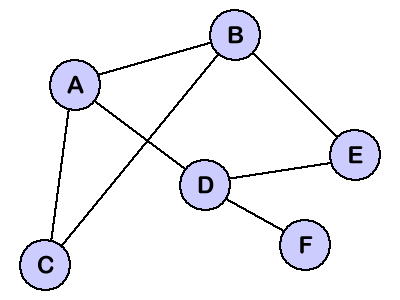
The last data structure that we will study in this tutorial is the graphs. Graphs are similar to trees except that, they do not have as many restrictions. In the previous tutorial, we saw that every tree has a root node, and all the other nodes in the tree are children of a perticular node. We also saw that the nodes can have many children but only one parent. When we relax these restrictions, we get the graph data structure. The logical representation of a typical graph might look something like the figure shown below:


Notice that our graph does not have any root node like the tree data structure. Instead, any node can be connected with any other node in the graph. Nodes do not have any clear parent-child relationship like we saw in the tree. Instead nodes are called as neighbors if they are connected by an edge. For example, node A above has three neighbors: B, C, and D.

It is not hard to imagine how the graph data structure could be useful for representing the data. Perhaps each of the nodes above could represent a city and the edges connecting the nodes could represent the roads. Or we could use a graph to represent a computer network where the nodes are workstations and the edges are the network connections. Graphs have so many applications in the computer science and mathematics that several algorithms have been written to perform the standard graph operations such as searching the graph and finding the shortest path between nodes of a graph.

Now that you have a basic idea of the logical representation of the graphs, let's take a look at one way that graphs are commonly represented in computers. The representation is called an adjacency matrix, and it uses the two-dimensional array to store the information about the graph nodes. The adjacency matrix for our graph is given below.

  A B C D E F
A
B
C
D
E
F
-- 1 1 1 -- --
1 -- 1 -- 1 --
1 1 -- -- -- --
1 -- -- -- 1 1
-- 1 -- 1 -- --
-- -- -- 1 -- --

Notice that the matrix shown above has six rows and six columns labeled with the nodes from the graph. We mark a '1' in a cell if there exists an edge from two nodes that index that cell. For example, since we have a edge between A and B, we mark a '1' in the cells indexed by A and B. These cells are marked with a dark gray background in the adjacency matrix. With our adjacency matrix, we can represent every possible edge that our graph can have.


Share And Enjoy:These icons link to social bookmarking sites where readers can share and discover new web pages.
  • blinkbits
  • BlinkList
  • blogmarks
  • co.mments
  • connotea
  • del.icio.us
  • De.lirio.us
  • digg
  • Fark
  • feedmelinks
  • Furl
  • LinkaGoGo
  • Ma.gnolia
  • NewsVine
  • Netvouz
  • RawSugar
  • Reddit
  • scuttle
  • Shadows
  • Simpy
  • Smarking
  • Spurl
  • TailRank
  • Wists
  • YahooMyWeb

Previous Next

Keywords: Graphs programming, graph c++, graph programming, graphing calculator programming, graphs in c++, linear programming graph, graphics programming, graphs tutorial, graphs java


HTML Quizes
HTML Quiz
XHTML Quiz
CSS Quiz
TCP/IP Quiz
XML Quizes
XML Quiz
XSL Quiz
XSLT Quiz
DTD Quiz
Schema Quiz
XForms Quiz
XSL-FO Quiz
XML DOM Quiz
XLink Quiz
XQuery Quiz
XPath Quiz
XPointer Quiz
RDF Quiz
SOAP Quiz
WSDL Quiz
RSS Quiz
WAP Quiz
Web Services Quiz
Browser Scripting Quizes
JavaScript Quiz
VBScript Quiz
AJAX Quiz
DHTML Quiz
HTML DOM Quiz
WMLScript Quiz
E4X Quiz
Server Scripting Quizes
ASP Quiz
PHP Quiz
PERL Quiz
SQL Quiz
ADO Quiz
.NET (dotnet) Quizes
Microsoft.Net Quiz
XML Web Services Quiz
ASP.Net Quiz
.Net Mobile Quiz
C# : C Sharp Quiz
ADO.NET Quiz
VB.NET Quiz
Multimedia Quizes
SVG Quiz
Flash Quiz
Media Quiz
SMIL Quiz
Web Building  Quizes
Web Browsers Quiz
Web Hosting Quiz
W3C Quiz
Web Building Quiz
Web Quality Quiz
Web Semantic Quiz
Web Careers Quiz
Java Quizes
Java Quiz
JSP Quiz
Servlets Quiz
Struts Quiz
EJB Quiz
JMS Quiz
JMX Quiz
Programming Langauges Quizes
C Quiz
C++ Quiz
Visual Basic Quiz
Data Structures Using C Quiz
Soft Skills Quizes
Communication Skills Quiz
Time Management Quiz
Project Management Quiz
Team Work Quiz
Leadership Skills Quiz
Corporate Communication Quiz
Negotiation Skills Quiz

Privacy Policy
Copyright © 2003-2008 Vyom Technosoft Pvt. Ltd., All Rights Reserved.